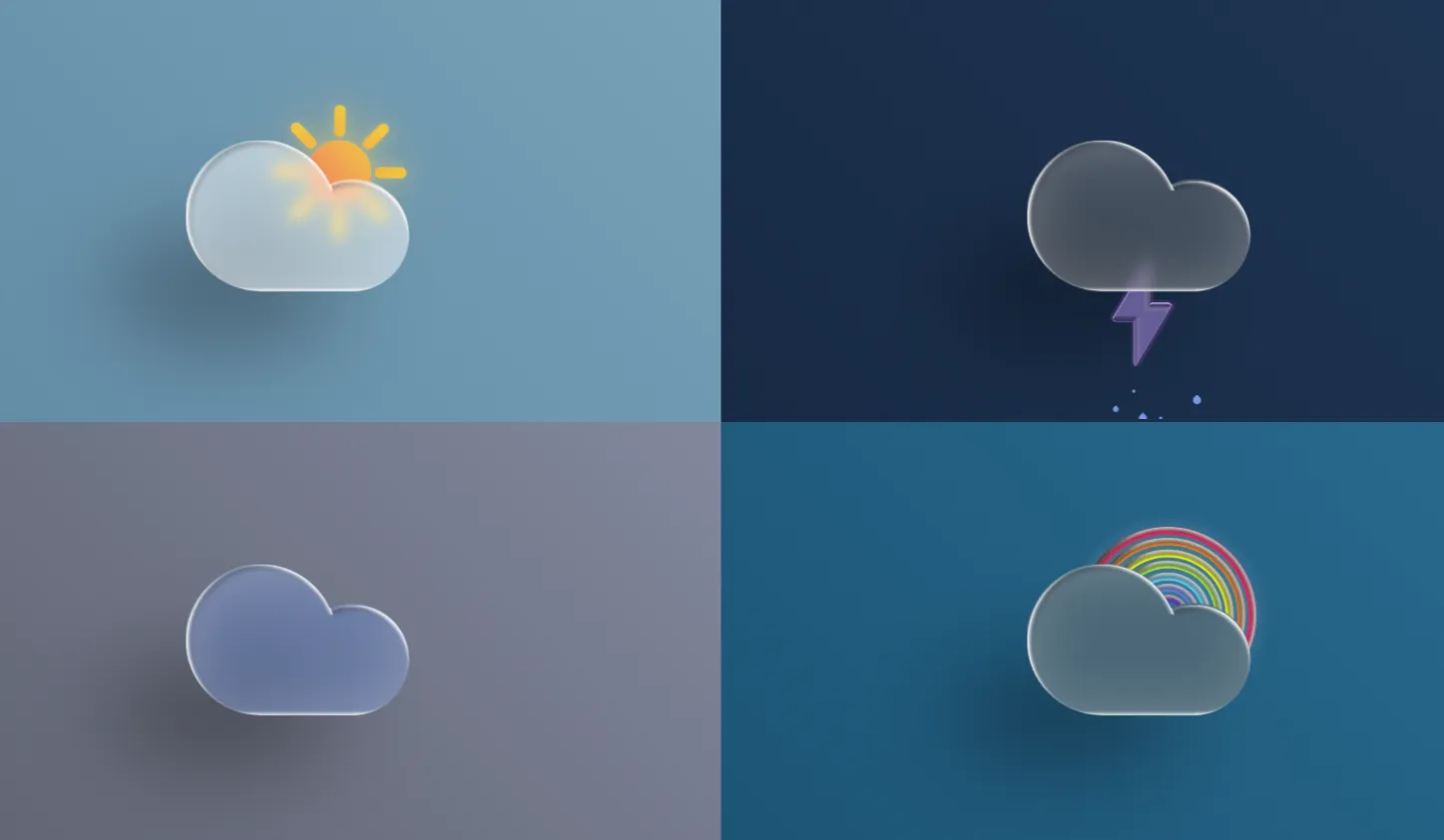
Modern user interfaces thrive on visual depth, tactile realism, and fluid interactions. The 3D Glass Weather Icons project is an open-source frontend web component built to elevate standard weather widgets into captivating visual experiences. By combining translucent glassmorphism aesthetics with realtime 3D rendering, this component turns everyday forecasts into engaging UI elements.
Built with Three.js, HTML5, CSS3, and Bootstrap 5, this template solves a common challenge facing web developers: creating sleek, high-performance visual elements without bloating page load times or relying on static, flat image assets. Traditional icon sets often feel rigid and static. In contrast, these 3D glass weather icons respond dynamically to user interactions, lighting changes, and environmental parameters.
Whether you are building a modern weather dashboard, a sleek web portal, or a dynamic mobile-first web app, this component provides a lightweight foundation. It solves the friction of integrating complex WebGL rendering into traditional DOM layouts, giving developers a turnkey solution that balances aesthetic sophistication with peak frontend performance.
Frontend engineers, UI/UX designers, and students can leverage this codebase to understand how modern shader-like visual effects, volumetric transparency, and realistic lighting interact within a browser environment. It serves as both a production-ready component and an educational sandbox for learning WebGL integration via Three.js.
Key Features
Glassmorphism Aesthetics
Delivers realistic visual refraction, light scattering, and frosted glass textures rendered directly inside the canvas.
Interactive 3D Controls
Allows users to rotate, hover, and tilt icons seamlessly with smooth mouse and touch input response.
Responsive Canvas Layout
Utilizes Bootstrap 5 grid utilities to adjust fluidly across mobile, tablet, and desktop viewports.
Dynamic Lighting Setup
Features customizable directional and ambient light sources that simulate realistic environmental reflections.
Zero Heavy Framework Dependencies
Runs smoothly on standard JavaScript without requiring complex build steps or framework overhead.
60 FPS Render Optimization
Engineered with low-polygon geometry and efficient requestAnimationFrame rendering loops to ensure high frame rates.
Custom Weather States
Includes pre-configured 3D models for sunny, cloudy, rainy, snowy, and stormy weather conditions.
Accessible Markup
Designed with semantic HTML structure and screen-reader accessible fallback descriptions.
Technologies Used
HTML5
HTML5 supplies the foundational structure of the application. It utilizes semantic tags such as <main>, <section>, and <canvas> to separate logical structural layers from graphic processing elements. The <canvas> element acts as the explicit rendering surface for WebGL context creation handled by Three.js.
CSS3
CSS3 provides backdrop filtering, gradient overlays, and custom properties to unify the web app's overall theme with the embedded 3D canvas objects. Key CSS features like backdrop-filter: blur() complement the Three.js glass material, ensuring that surrounding UI elements harmonize with the 3D icons.
Bootstrap 5
Bootstrap 5 delivers a flexible layout system, utility classes, and typography setups. Because Bootstrap 5 operates without jQuery, it keeps script bundle sizes lean while providing instant mobile-first responsiveness for surrounding UI components, card containers, and control panels.
JavaScript & Three.js
Vanilla JavaScript coordinates DOM events, user input listeners, and initialization sequences. Three.js acts as the 3D engine, simplifying WebGL operations. It abstracts scene setup, mesh generation, material shaders (such as Physical Material refraction), camera positioning, and requestAnimationFrame render cycles into intuitive API calls.
How It Works
The workflow of this project relies on a hybrid pipeline where standard DOM elements collaborate with a WebGL rendering canvas.
- Scene Initialization: The script sets up a Three.js
Scene, aPerspectiveCamera, and aWebGLRenderertargeted at the HTML canvas. - Material Configuration: Glass properties are instantiated using
MeshPhysicalMaterial, applying values for transmission, opacity, roughness, and metalness to simulate realistic glass refraction. - Geometry Assembly: Weather geometries (clouds, suns, raindrops, lightning bolts) are constructed programmatically or loaded as lightweight 3D models.
- Lighting & Shadows: Point lights and ambient lights illuminate the glass material, highlighting edge highlights and volumetric depth.
- Interaction Handlers: Event listeners track cursor movement or touch drags, introducing subtle rotation offsets to the 3D meshes for an interactive user feel.
- Animation Loop: A continuous render loop updates object rotations and light positions smoothly at 60 frames per second.
Benefits
| User Role | Primary Benefit | Impact |
|---|---|---|
| Students | Practical WebGL experience | Learn 3D rendering concepts in JavaScript without needing advanced math shaders. |
| Developers | Plug-and-play code structure | Integrate high-end visual features into commercial or open-source projects fast. |
| Designers | Modern glassmorphism UI | Prototype realistic 3D interface components directly in the browser environment. |
| Freelancers | High-value client deliverables | Offer modern, animated UI components that set work apart from generic site templates. |
| Portfolio Creators | Standout project showcase | Demonstrate mastery over modern web technologies like Three.js and interactive design. |
Real World Use Cases
- 1. Weather Web Dashboards: Display regional forecast updates using eye-catching, real-time 3D models instead of flat SVG icons.
- 2. Smart Home Interfaces: Integrate interactive 3D climate icons into touch-screen smart home control panels.
- 3. Travel & Booking Websites: Show destination weather conditions dynamically during booking journeys.
- 4. Mobile Web Applications: Enhance web apps with interactive visual cues that feel like native iOS or Android widgets.
- 5. E-Commerce Banners: Use seasonal 3D weather effects in promotional heroes to highlight outdoor clothing or gear.
- 6. Portfolio Highlights: Showcase your technical frontend mastery to potential recruiters and clients.
- 7. Educational Tools: Teach elementary science students weather patterns through interactive 3D models.
- 8. Desktop Widgets (Electron): Build custom desktop weather widgets utilizing web-standard technologies.
Performance & SEO
Performance and search optimization are critical when integrating 3D assets into modern web applications. Heavy graphics can trigger high page load times if improperly handled, negatively impacting core web vitals.
Fast Loading & Lightweight Assets
The 3D assets use low polygon counts combined with procedural materials. This approach minimizes file size, ensuring quick downloads and fast visual presentation.
Responsive Layouts
Bootstrap 5 utilities automatically scale the container layout, while Three.js resize listeners adjust viewport aspect ratios seamlessly across devices.
Accessibility Best Practices
Screen readers receive proper ARIA labels and alt tags on parent wrapper elements, keeping interactive canvas content accessible to all users.
Semantic HTML & Clean Code
Clean separation of logic makes it easy for search engine crawlers to parse structural content while indexers interpret page context accurately.
Customization Guide
Adapting these 3D glass icons to fit your brand colors or layout requirements is straightforward:
-
Changing Colors: Modify the
colorparameter in theMeshPhysicalMaterialinstantiation inside your JavaScript file. Adjust environmental light colors for custom atmospheric hues. -
Adjusting Animations: Alter rotation speeds or hover intensities within the
requestAnimationFrameloop function. You can introduce floating wave physics using trigonometricMath.sin()offsets. -
Updating Layout & Components: Modify Bootstrap 5 utility classes (e.g.,
col-lg-4,p-4,rounded-3) within the index HTML file to rearrange canvas dimensions and widget cards. - Typography & Fonts: Swap font styles easily by updating Google Fonts references in CSS rules without breaking canvas dimensions.
Who Should Use This Project?
This project is tailored for web professionals and hobbyists looking to enhance their frontend applications. It benefits **frontend engineers** seeking clean Three.js integration patterns, **UI/UX designers** prototyping modern glassmorphism components, and **programming students** exploring 3D graphics in standard JavaScript. Additionally, **freelancers and agencies** can utilize this open-source code to deliver visually captivating, high-performance web components for client builds.
Conclusion
The 3D Glass Weather Icons project balances modern web graphics with practical frontend implementation. By merging Three.js glass material capabilities with Bootstrap 5 responsiveness, it provides a versatile component that improves user engagement without sacrificing site performance. Explore the source code, customize the materials, and elevate your web projects with modern 3D UI elements today.
Frequently Asked Questions
How does this project work?
It uses Three.js to render low-poly 3D models inside an HTML5 canvas element. The glass effect is calculated in real-time using physical material reflection and refraction properties managed by JavaScript.
Can beginners learn from this project?
Yes. The code structure is organized cleanly and avoids unnecessary build tools, making it an excellent starting point for learning Three.js and WebGL integration.
Is it mobile responsive?
Yes. The surrounding card components use Bootstrap 5, and the canvas dynamically resizes based on screen dimensions to deliver a smooth experience across mobile devices.
Can I use it commercially?
Yes. The project is open-source, allowing you to use, modify, and integrate it into personal or commercial projects without restriction.
How do I customize it?
You can change material parameters like transparency and roughness, modify light sources in the JavaScript code, or alter container styling using standard CSS3 and Bootstrap classes.
Does it require Bootstrap?
While this project utilizes Bootstrap 5 for fast responsive positioning, the core 3D canvas rendering code works independently in any HTML layout.
Is JavaScript required?
Yes. JavaScript handles scene generation, camera placement, lighting calculations, user interaction events, and render cycles via the Three.js library.
Can I add this to my portfolio?
Absolutely. Customizing and embedding this project into your personal portfolio demonstrates your ability to work with modern frontend graphics technologies like WebGL and Three.js.
Download is Locked
Please scroll down to view the full page and unlock the download link.
Your Download is Ready
Click the button below to retrieve the project source code.
More Related Items by CodeTap
View All