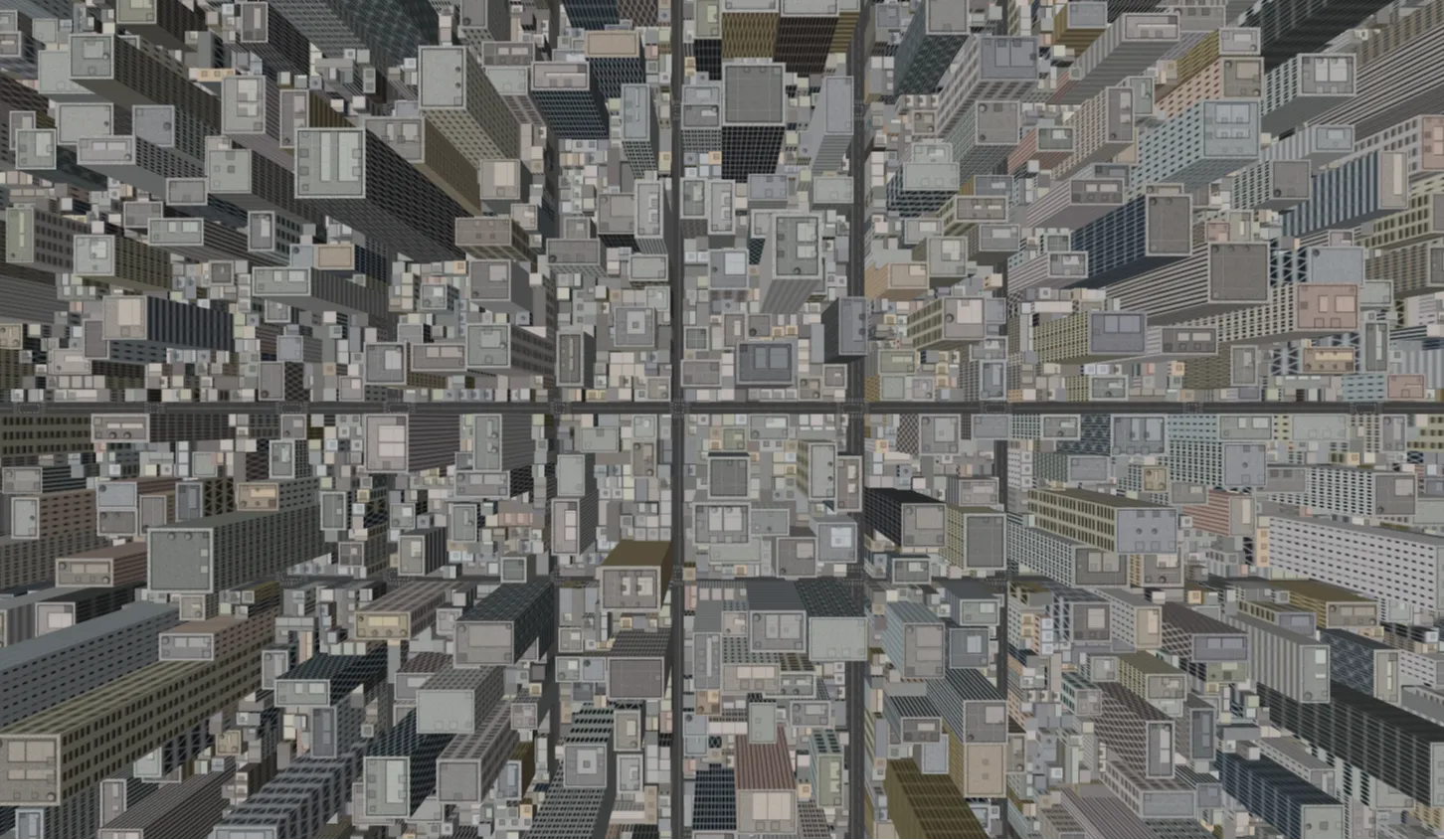
Bird’s Eye Metropolis is an open-source web application designed to bring complex 3D cityscapes directly into modern browsers. Built on a lightweight frontend stack, this interactive project gives web developers, students, and digital creators an intuitive canvas for exploring web-based graphics. By rendering procedural urban structures using 3D visual rendering techniques alongside a clean user interface, the project provides an immediate visual experience without requiring heavy external plugins.
The project was built to address a common obstacle in web development: the steep learning curve associated with WebGL rendering and spatial scene construction. While many interactive graphics projects rely on complex frameworks or heavy asset pipelines, Bird’s Eye Metropolis demonstrates how clean native code and efficient rendering loops can deliver responsive visuals across high-density displays.
By providing an accessible foundation, this project solves the challenge of prototyping high-performance urban graphics for web application interfaces. Modern web users demand immersive experiences, yet developers often lack simple, modular boilerplate code to test camera perspective shifts, lighting conditions, and dynamic geometry handling in real-time environments.
Frontend engineers and students should adopt this project to deepen their technical understanding of canvas manipulation, frame-budget management, and responsive 3D viewport adjustments. It acts as an effective learning resource, bridging the gap between basic web scripting and real-time interactive visual modeling.
Key Features
Bird’s Eye Metropolis incorporates several core features designed to enhance performance, usability, and visual quality for frontend applications:
1. Real-Time 3D Rendering
Executes smooth visual rendering directly within HTML5 Canvas environments utilizing WebGL hardware acceleration.
2. Dynamic Camera Control
Supports smooth panning, rotation, and zooming mechanisms that simulate an overhead aerial camera angle.
3. Responsive Viewport Scaling
Automatically recalculates aspect ratios and camera projections upon window resize to maintain visual fidelity.
4. Integrated Bootstrap Control Panel
Features an intuitive overlay interface for tweaking scene variables without cluttering the viewport.
5. Optimized Geometry Pipeline
Utilizes instanced mesh geometries to display dense urban architecture while minimizing draw calls.
6. Atmospheric Lighting Models
Includes ambient and directional light maps to create realistic depth, highlights, and subtle shadow dynamics.
7. Lightweight Code Architecture
Written without unnecessary external dependencies, making initialization quick and code inspection straightforward.
8. Cross-Browser Compatibility
Tested to run reliably across modern evergreen browsers including Chrome, Edge, Firefox, and Safari.
Technologies Used
HTML5
HTML5 provides the structural foundation for the application. It utilizes semantic layout elements alongside the native <canvas> element, which serves as the target container for rendering the WebGL viewport. Proper canvas attributes ensure high DPI rendering on modern screens.
CSS3
CSS3 is responsible for styling the surrounding web environment, canvas overlays, and transition effects. Through modern flexbox layouts and positioning rules, CSS handles layer management, ensuring that user controls remain visible and accessible over the active 3D scene.
Bootstrap 5
Bootstrap 5 delivers a modern user interface grid system and pre-styled components. It structures the application controls, navigation bars, and informational sidebars, ensuring that UI components maintain responsive proportions across mobile devices, tablets, and desktop displays.
JavaScript & Three.js
JavaScript powers the operational logic, state management, and user interaction handlers. Utilizing the Three.js graphics library, JavaScript orchestrates scene creation, camera projections, light source placements, material assignments, and continuous render loops essential for real-time motion.
How It Works
The application architecture operates through a sequence of well-defined steps designed to manage performance and maintain smooth visual execution:
-
Scene InitializationThe script instantiates a core scene graph, sets up perspective cameras, and attaches the renderer to the HTML5 canvas element within the DOM.
-
Geometry & Material AssemblyStructural blocks, roads, and environmental meshes are programmatically defined and placed using transformation vectors within a coordinate grid.
-
Lighting CalculationAmbient lighting provides overall visibility, while directional light sources simulate natural sunlight casting depth across building facets.
-
Continuous Animation LoopThe
requestAnimationFrameloop continuously updates camera matrices and renders frame updates to achieve smooth performance.
Benefits across Disciplines
| Role | Practical Benefit |
|---|---|
| Students | Gains a hands-on codebase to study 3D geometry calculations, canvas contexts, and matrix transformations in a readable format. |
| Developers | Saves time by utilizing a ready-to-use template for web visualizers, simulation dashboards, or game prototypes. |
| Designers | Offers an interactive sandbox to test color palettes, lighting moods, and spatial UI overlays on top of 3D canvasses. |
| Freelancers | Provides a modular project shell that can be adapted for client landing pages requiring unique visual hero sections. |
| Portfolio Creators | Delivers an impressive interactive showcase item that highlights proficiency in modern JavaScript and graphic rendering. |
Real World Use Cases
1. Smart City Data Dashboards
Mapping real-time traffic or utility data onto 3D building coordinates.
2. Architectural Showcases
Displaying conceptual urban developments interactively within web browsers.
3. Web Game Environments
Serving as a base map for lightweight browser strategy or simulation games.
4. Interactive Logistics Tracking
Visualizing fleet distribution routes overhead in a stylized city layout.
5. Real Estate Landing Pages
Presenting property locations within a broader neighborhood context visualizer.
6. Educational WebGL Modules
Teaching students matrix operations and 3D space coordinates interactively.
7. Event Venue Maps
Rendition of large-scale outdoor festival layouts or convention districts.
8. Creative Agency Portfolios
Functioning as an eye-catching background element for technical marketing sites.
Performance & Technical Optimization
High-performance standards ensure that Bird's Eye Metropolis delivers steady frame rates and rapid load times. The codebase follows WebGL optimization best practices to maintain stability across varying device capabilities:
- Fast Loading: Minimal external assets ensure low initial page payload and instant script execution.
- Responsive Canvas handling: Dynamically matches display resolution to prevent blurriness on Retina displays.
- Accessibility Focus: UI elements maintain sufficient contrast and keyboard accessibility where applicable.
- Clean Architecture: Modularity facilitates straightforward code navigation, refactoring, and updates.
- Semantic Standards: HTML structure follows strict standards for optimal search indexation and screen reader interpretation.
- Mobile Optimization: Reduced visual complexity profiles help preserve battery life and prevent frame drops on mobile devices.
Customization Guide
Bird's Eye Metropolis is built to be customized. Developers can easily alter the code to suit different visual aesthetics or project needs:
Customizing Colors
Modify scene backgrounds and mesh materials by adjusting color hex codes inside the scene configuration script.
Modifying Animations
Adjust camera rotation speed or object movement factors directly within the main animation render loop.
Altering the Layout
Change building density or floor height distributions by editing the object placement loop parameters.
Font Configuration
Update Bootstrap class overrides in CSS to swap interface typography instantly across all overlay menus.
Adding Components
Import additional custom meshes or geometric primitives using standard Three.js loader functions.
Who Should Use This Project?
This project is ideal for modern web developers looking to integrate 3D elements into their applications without starting from scratch. Specifically, it offers value to:
Students
Learning 3D graphics concepts hands-on.
Frontend Engineers
Building immersive, modern web apps.
UI/UX Designers
Testing dynamic visual overlays.
Conclusion
Bird’s Eye Metropolis demonstrates how modern frontend technologies can be combined to build lightweight, responsive 3D web applications. By pairing Three.js graphics processing with Bootstrap 5 layout structures, this project provides a solid blueprint for building scalable WebGL interfaces. Whether you are learning 3D canvas manipulation, building interactive client applications, or enhancing your portfolio, this project serves as a practical, open-source foundation.
Frequently Asked Questions
How does this project work?
It uses Three.js to render 3D scenes inside an HTML5 canvas, while JavaScript manages camera movements and Bootstrap 5 handles the user interface elements.
Can beginners learn from this project?
Yes, the codebase is modular and well-structured, making it easy for beginner developers to inspect scene setup, material properties, and animation loops.
Is it mobile responsive?
Yes, the application automatically scales rendering dimensions and UI component overlays according to screen sizes.
Can I use it commercially?
Yes, as an open-source project, you can freely adapt and integrate the codebase into commercial or personal projects.
How do I customize it?
You can customize parameters directly in JavaScript files to update object coordinates, lighting parameters, colors, camera perspectives, and visual elements.
Does it require Bootstrap?
Bootstrap 5 is used for modern user interface controls, but the core visual rendering logic in Three.js can run independently if needed.
Is JavaScript required?
Yes, JavaScript is required to manage WebGL execution, set up scene matrices, and render animations to the browser canvas.
Can I add this to my portfolio?
Absolutely. You can use this open-source project to demonstrate proficiency in 3D frontend web graphics and WebGL development.
Download is Locked
Please scroll down to view the full page and unlock the download link.
Your Download is Ready
Click the button below to retrieve the project source code.
More Related Items by CodeTap
View All