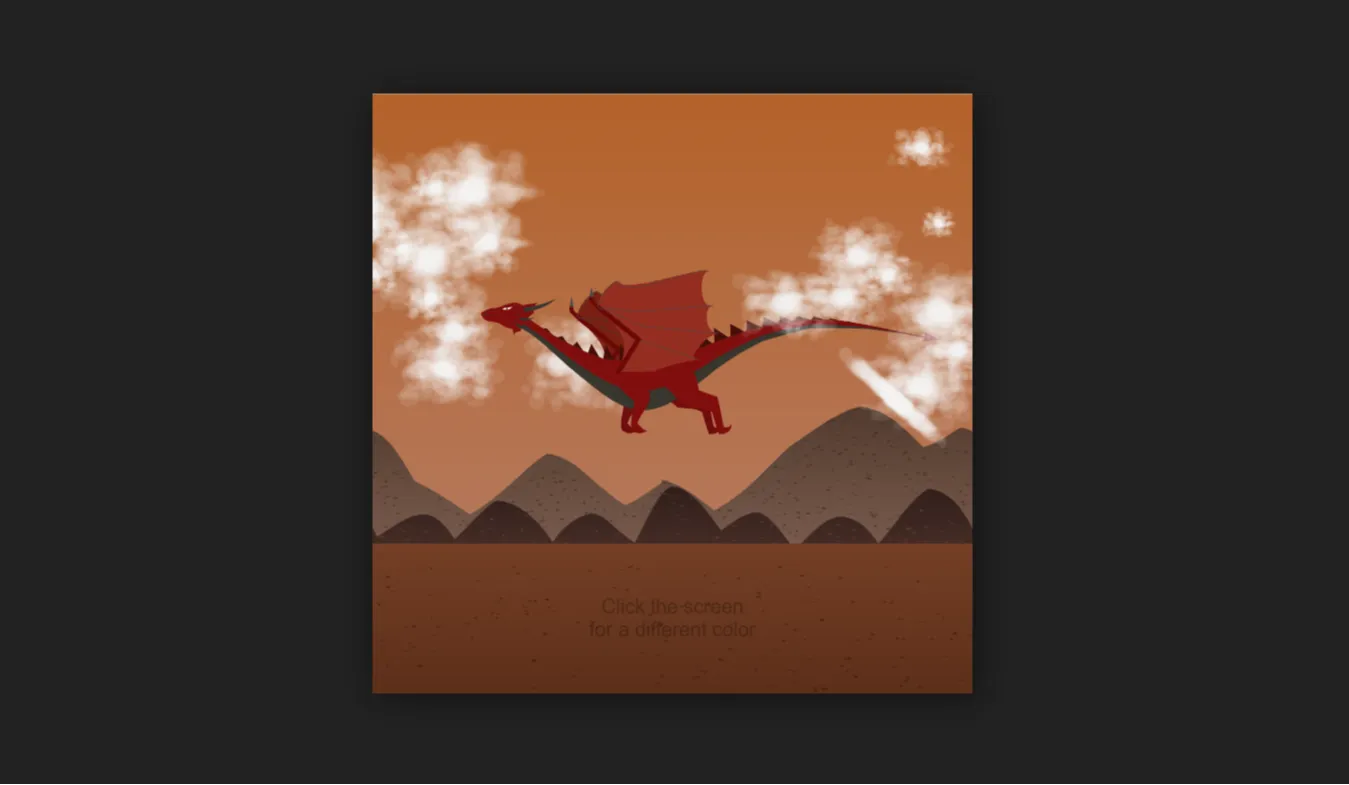
Creating realistic 3D visuals on the modern web no longer requires bloated external plugins or heavy desktop rendering engines. The Dragon Animation project published on CodeTap showcases how web technologies like Three.js, native JavaScript, HTML5, CSS3, and Bootstrap 5 can render fluid, interactive 3D creatures right inside a standard web browser.
This project was built to provide developers, students, and UI designers with a lightweight, open-source reference for browser-based 3D graphics rendering. By combining WebGL abstraction libraries with clean structured front-end markup, this project demonstrates how to handle spatial coordinates, lighting, particle physics, and frame-rate loops without slowing down user interactions or causing performance drops.
For many frontend engineers, jumping directly into raw WebGL shaders can be intimidating due to complex matrix math and detailed buffer management. This project solves that entry barrier. It abstracts complex math into clear, manageable JavaScript modules, making 3D creature animation accessible to developers transitioning from 2D DOM manipulation to 3D canvas rendering.
Whether you are building an immersive landing page, designing an interactive gaming portal, or assembling a unique developer portfolio, studying this codebase gives you practical insights into camera controls, ambient light setups, high-performance rendering loops, and responsive layout integration.
Key Features
Real-Time WebGL Rendering
Leverages hardware acceleration via Three.js to render smooth 3D geometry directly within HTML5 canvas elements at high frame rates.
Interactive Orbit Controls
Allows users to rotate, pan, and zoom around the animated dragon model using intuitive mouse drags or touch gestures on mobile screens.
Dynamic Lighting Setup
Combines directional, ambient, and point lights to highlight specular reflections, scales texture depth, and realistic shadow casts.
Responsive Viewport Handling
Automatically listens for browser window resize events and recalculates aspect ratios and perspective matrices to prevent image distortion.
Skeletal Rigging & Keyframe Loops
Features smooth skeletal bone movement to simulate organic wing flaps, tail swishes, and body swaying in continuous animation loops.
Clean Bootstrap 5 UI Layout
Wraps the interactive 3D canvas in a modern, accessible interface with well-styled control panels, action buttons, and text overlays.
Optimized Asset Delivery
Minimizes file sizes and resource requests to ensure fast initial page loads, lower bandwidth usage, and reduced mobile CPU strain.
Modular Codebase
Organizes camera setup, scene creation, light positioning, and loop execution into clean, commented, readable JavaScript files.
Technologies Used
HTML5
HTML5 forms the structural backbone of this project. It supplies semantic structural wrappers such as main sections, headers, and footer blocks, while providing the dedicated <canvas> element where WebGL contexts attach to display the 3D scene.
CSS3
Custom CSS3 styles control canvas positioning, element z-indexes, transition effects, and interface overlays. It guarantees that control panels float cleanly above the 3D scene while keeping typography clear and legible across varied light backgrounds.
Bootstrap 5
Bootstrap 5 handles utility spacing, layout grids, button styles, and responsive UI components. Using Bootstrap's utility classes avoids writing redundant custom layout styles and ensures immediate compatibility across diverse display viewports.
JavaScript & Three.js
Vanilla JavaScript manages the logic, event handling, and animation frames. The integrated Three.js framework acts as an abstraction layer over WebGL, handling 3D scene construction, mesh material properties, camera views, light positions, and render loops efficiently.
How It Works
The overall architecture operates through a continuous rendering pipeline that coordinates graphic initialization, asset loading, user input listeners, and frame updates:
- Scene & Camera Initialization: The core script instantiates a
THREE.Scene()container alongside aTHREE.PerspectiveCamera(). Parameters such as field of view, aspect ratio, near clipping plane, and far clipping plane are configured immediately. - WebGL Renderer Mounting: A
THREE.WebGLRenderer()instance is created with antialiasing enabled. Its output DOM element is appended directly into the specified target wrapper in the HTML document. - Lighting Application: An
AmbientLightprovides base exposure to the entire scene, while aDirectionalLightcasts realistic highlights and directional shadows over the dragon's body geometry. - 3D Mesh & Texture Mapping: The dragon geometry and texture maps are loaded into memory. Materials like
MeshStandardMaterialorMeshPhongMaterialapply physical reflections based on scene light sources. - Animation Loop Execution: Using
requestAnimationFrame(), the script triggers a recursive render cycle. During each tick, bone rotations, wing angles, and spine curves calculate updates based on delta time. - Event Listener Management: Resize events dynamically recalculate the camera's aspect ratio and renderer pixel dimensions, while pointer events update camera angles smoothly.
Benefits
| User Role | Primary Benefit | Practical Application |
|---|---|---|
| Students | Practical WebGL Learning | Understand 3D coordinate systems, vector math, camera matrices, and lighting mechanics without reading dry mathematical textbooks. |
| Developers | Reusable Boilerplate | Extract camera controls, window resize handlers, and render-loop routines to fast-track commercial WebGL project builds. |
| Designers | Visual Inspiration | Explore how 3D elements can elevate standard 2D user interfaces and create memorable digital brand experiences. |
| Freelancers | Client Showcase Tool | Demonstrate modern frontend capabilities to high-value prospective clients seeking interactive web experiences. |
| Portfolio Creators | Standout Project Demonstration | Add an eye-catching interactive 3D showcase piece that catches the attention of hiring managers and recruiters. |
Real World Use Cases
1. Web Gaming Landing Pages
Use animated 3D creature models on teaser pages for upcoming video games to boost visitor engagement and signups.
2. Interactive Educational Portals
Integrate dynamic 3D biology or fantasy models into learning modules so students can inspect anatomy from any perspective.
3. Creative Agency Portfolios
Embed 3D canvas visuals inside agency hero banners to highlight high-end digital design and development capabilities.
4. Product Marketing Campaigns
Adapt the rendering loop structure to present 3D products, apparel, or hardware interactively in online retail environments.
5. Web3 & NFT Showcases
Display digital collectibles or avatar assets in real-time within browser dashboards with full orbit interaction.
6. Event & Tech Conference Websites
Build memorable event landing pages featuring theme-appropriate 3D mascot animations to increase ticket sales conversions.
7. Interactive Storytelling & Web Comics
Enrich online narrative experiences by triggering 3D character movements as users scroll down the page.
8. Developer Skill Demos
Utilize the clean source code as an educational reference when preparing for frontend technical interviews involving graphics programming.
Performance & SEO
Developing rich 3D browser experiences requires balancing visual complexity with core web performance metrics. This project follows technical SEO and performance best practices:
- Fast Initial Page Loading: Scripts load asynchronously or at the end of the body tag to avoid blocking DOM parsing and initial paint operations.
- Responsive Adaptive Views: Bootstrap grids combined with flexible canvas sizing ensure smooth performance on mobile phones, tablets, and high-resolution desktop displays.
- Accessibility Considerations: Non-text canvas elements are accompanied by semantic HTML text markup, ARIA labels, and readable controls for screen reader compatibility.
- Clean Code Architecture: Modular JavaScript prevents global scope pollution, minimizes garbage collection spikes, and optimizes memory usage during prolonged rendering.
- Semantic HTML Structure: Structured section headers, semantic elements, and clean markup help search engine crawlers interpret and index content efficiently.
- Mobile Friendly Design: Touch event integration enables smooth gesture controls on mobile screens without interfering with page scrolling performance.
Customization Guide
Modifying this project to fit custom project themes or personal branding takes just a few steps:
Changing Colors & Materials
Locate the mesh material definition within the JavaScript file. Modify the color, roughness, or metalness values to quickly alter the dragon's skin tone and light reflectivity:
// Example: Modifying Material Color in Three.js
const dragonMaterial = new THREE.MeshStandardMaterial({
    color: 0xff2200, // Change hex color code here
    roughness: 0.4,
    metalness: 0.6
});
Adjusting Animations
In the animation loop function, alter time multiplier values to speed up or slow down wing flaps and body sways. You can also hook keyframe timings into scroll parameters for scroll-triggered animations.
Modifying Layout & Styling
Edit the Bootstrap 5 class attributes inside index.html to adjust background contrast, container paddings, card structures, or alignment properties easily.
Customizing Fonts & UI Controls
Replace default typography by linking Google Fonts in the HTML head section, then apply styling rules via CSS variables or utility classes.
Who Should Use This Project?
- Frontend Engineers: Looking to sharpen their understanding of WebGL abstractions and modern canvas manipulation techniques.
- Computer Science Students: Seeking practical open-source code examples to study 3D computer graphics concepts.
- Web Designers: Wanting to evaluate how 3D elements can complement standard grid layouts and improve user engagement metrics.
- Bootcamp Instructors: Searching for practical visual teaching resources that connect JavaScript logic with real-time visual output.
Conclusion
The Dragon Animation project published on CodeTap highlights how modern browser technologies bring dynamic 3D visuals to life without complex setup procedures or third-party plugins. Combining the power of Three.js with structural HTML5, modern CSS3, Bootstrap 5, and JavaScript, it serves as an educational blueprint for developers looking to create rich graphics on the web.
Whether you want to learn WebGL fundamentals, build immersive user interface components, or improve your developer portfolio, this project offers a solid, well-structured foundation to start building upon today.
Frequently Asked Questions
How does this project work?
It uses Three.js to construct a 3D scene, camera, lights, and mesh models rendered inside an HTML5 canvas element, continuously refreshed using JavaScript requestAnimationFrame loops.
Can beginners learn from this project?
Yes, the code is structured modularly with clear separation between HTML structure, CSS layouts, and JavaScript logic, making it easy to read and understand.
Is it mobile responsive?
Yes, the layout uses Bootstrap 5 grid utilities while JavaScript dynamic event handlers adjust canvas sizes to match mobile screen dimensions seamlessly.
Can I use it commercially?
Yes, you can customize, build upon, and integrate this codebase into your own commercial web projects, client builds, or personal apps.
How do I customize it?
You can easily customize lighting properties, mesh material parameters, skin colors, animation loop timings, and UI control elements by editing the provided JavaScript and HTML files.
Does it require Bootstrap?
Bootstrap 5 is used for quick responsive UI layout wrapper components, but the core Three.js 3D animation code can run independently in any standard HTML canvas element.
Is JavaScript required?
Yes, JavaScript is required to run the Three.js rendering engine, camera controls, light positioning, geometry setup, and continuous animation frame loops.
Can I add this to my portfolio?
Absolutely. Studying, customizing, and showcasing this interactive 3D project is a great way to highlight your front-end graphic web development skills to prospective employers.
Download is Locked
Please scroll down to view the full page and unlock the download link.
Your Download is Ready
Click the button below to retrieve the project source code.