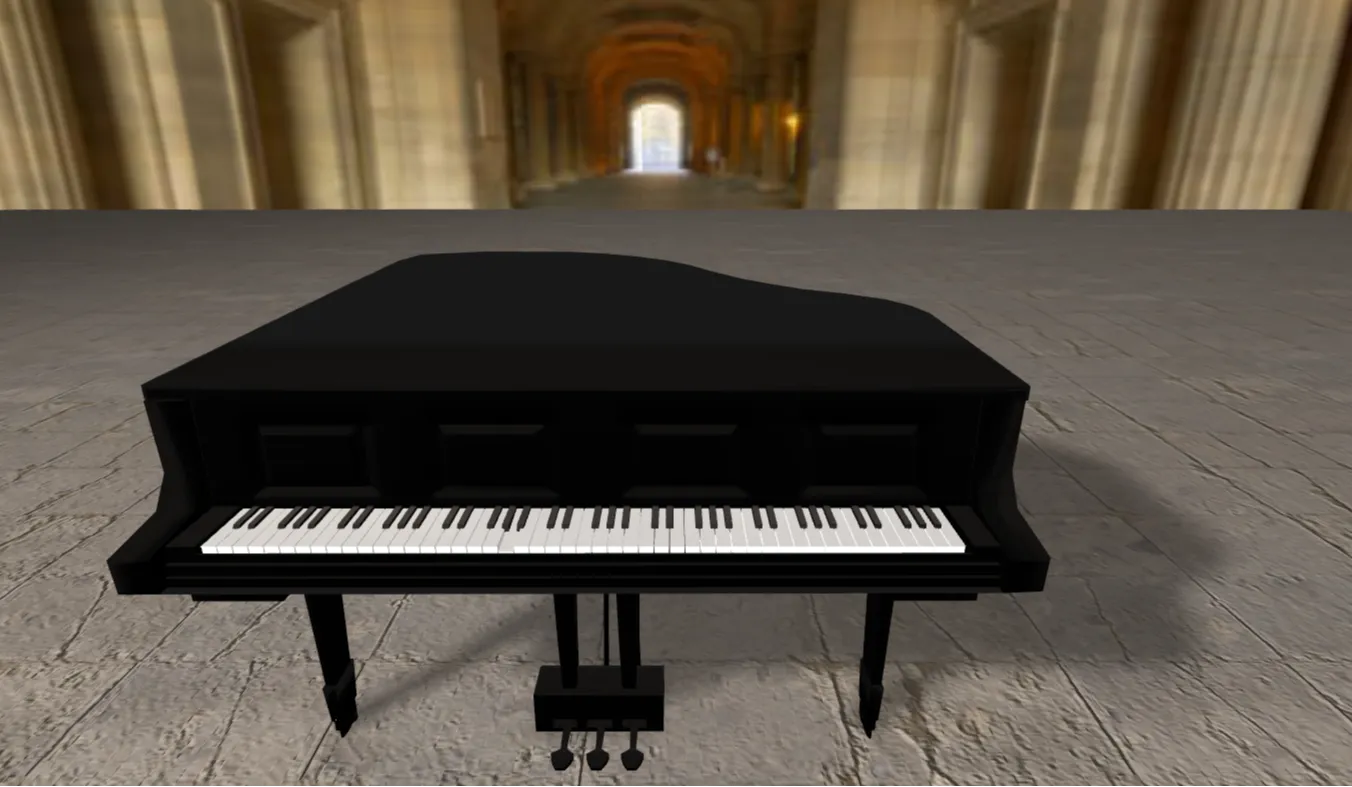
In the evolving landscape of modern frontend development, static two-dimensional layouts are gradually yielding ground to immersive, spatial user experiences. Designer Desk Pure is an interactive, browser-based 3D workspace simulator crafted specifically to bridge the gap between traditional web layout structures and advanced spatial computing. Built on top of the robust WebGL abstraction layer, Three.js, and styled using the responsive utilities of Bootstrap 5, this application serves as both a high-fidelity demonstration piece and a foundational blueprint for engineers looking to master spatial design interfaces.
The primary motivation behind engineering Designer Desk Pure was to address a common friction point faced by contemporary frontend developers: the steep learning curve associated with introducing three-dimensional graphics into production-ready web platforms. Traditionally, working with native WebGL requires complex mathematical calculations, low-level matrix manipulations, and intense memory management workflows. This setup frequently discourages web engineers who are used to standard DOM orchestration. This open-source tool abstracts away those pain points by providing an organized, modular architecture where standard semantic HTML elements, responsive CSS layers, and declarative JavaScript seamlessly interface with an active WebGL canvas container.
For developers, students, and digital creators, this application provides an immediate answer to the problem of standing out in an over-saturated digital market. Standard, rigid flat grids can fail to capture user engagement effectively. By implementing this production-grade interactive model, professionals can showcase their projects inside a dynamic, realistic virtual developer studio. Utilizing a combination of programmatic raycasting, physics-oriented orbit tracking, and carefully calculated lighting rigs, this application transforms an ordinary browser window into a rich, interactive workspace environment that significantly boosts user retention and user session duration metrics.
Key Features
- Interactive 3D Perspective Canvas Features a fully operational Three.js viewport utilizing WebGL context rendering to provide smooth frame rates across major desktop browsers.
- Dynamic Orbital Camera Controls Utilizes customized `OrbitControls` implementations to enable smooth panning, zooming, and rotation limits, keeping the viewport bounded.
- Responsive Bootstrap 5 HUD Layout Integrates a clean, modern heads-up display dashboard overlay that scales responsively from widescreen desktop displays down to mobile viewports.
- Optimized Ambient and Direct Lighting Configured with balanced hemispherical ambient lights combined with precise directional light mapping to produce realistic material highlights.
- Modular Object Architecture Built using decoupled JavaScript functions for object initialization, enabling simple mesh adjustments and asset instantiation workflows.
- Customizable Material Shaders Employs flexible `MeshStandardMaterial` properties allowing developers to modify roughness, metalness, and maps via intuitive programmatic configs.
- Real-Time Event Broadcast Loop Utilizes a continuous requestAnimationFrame loop that matches monitor refresh rates to handle smooth transformations and fluid element state changes.
- Low Latency UI Control Toggles Features built-in JavaScript event handlers mapping graphical dashboard inputs directly to the live 3D coordinate attributes without noticeable lag.
Technologies Used
HTML5: The foundation of the layout is built on structured, semantic HTML5 tags. The markup isolates the core canvas window wrapper from functional overlay navigation structures, ensuring assistive technologies like screen readers can easily scan document landmarks, forms, and technical descriptive components.
CSS3: Custom cascading stylesheets handle the overlay configuration, cross-browser flexbox layouts, and pointer-event manipulations. By using precise stacking contexts, custom CSS prevents DOM control elements from interfering with mouse tracking events over the active WebGL canvas area.
Bootstrap 5: This frontend utility framework delivers rapid grid styling and responsive scaling behavior. Using native utility classes like padding, margins, flex alignment, and display visibility states eliminates the need for bulky custom media query code bases.
JavaScript (ES6+) & Three.js: Vanilla modern JavaScript orchestrates the overall application runtime, resource allocation, and view configurations. The production codebase imports the Three.js library to handle critical 3D scene elements, camera matrices, light rendering engines, and continuous coordinate rendering math routines.
How It Works
When a visitor lands on the project page on CodeTap, the client browser initializes the main JavaScript execution stack, setting up the foundation for the visual environment. First, an empty virtual scene wrapper is built alongside a specialized perspective camera matrix. This camera calculates accurate spatial dimensions based on the pixel aspect ratio of the user's browser viewport. Once these structural nodes are securely established, the rendering engine attaches an optimized HTML5 canvas element directly to the target DOM node, opening up a direct hardware-accelerated pipeline straight to the user's graphical processing hardware.
With the underlying WebGL context active, the modular engine runs the custom mesh creation routines. Geometric vectors defining objects like desks, monitors, and keyboard setups are instantiated as analytical mathematical models. These pure shapes are then wrapped inside realistic, lighting-aware physical material layers that dictate how light reflects across their surfaces. A central draw function triggers continuously using the browser's native window frame refresh controller. This continuous execution pattern recalculates rotation matrices, processes lighting changes, and updates the viewport dynamically, ensuring a consistent, stutter-free user experience.
Target Audience Benefits
| User Group | Practical Implementation Benefits |
|---|---|
| Students | Provides a clean, easy-to-understand codebase for studying coordinate vector systems, material properties, and basic linear algebra workflows in real-world applications. |
| Developers | Serves as a production-tested boilerplate framework for rapid application prototyping, removing the friction of setting up base Three.js boilerplate environments. |
| Designers | Offers an excellent sandbox playground to test digital product placement, spatial composition principles, color palettes, and lighting behavior without needing complex CAD software installs. |
| Freelancers | Delivers a highly interactive marketing asset designed to impress premium business clients and secure high-value contracts through creative frontend capabilities. |
| Portfolio Creators | Supplies a unique, eye-catching creative component that sets standard portfolio sites apart from flat, generic templates across engineering communities. |
Real World Use Cases
-
1. Interactive Resume Component: Embed the workspace canvas directly inside a biographical portfolio landing page to act as a dynamic, interactive background showcase.
-
2. E-Commerce Furniture Preview: Adapt the asset configuration files into a lightweight store module where online customers can customize and inspect desk options before purchase.
-
3. Academic Spatial Sandbox: Deploy the clean structure in STEM classrooms to visibly demonstrate vector shifts, three-axis orientation rules, and asset scale mechanics.
-
4. SaaS Product Management Dashboard: Incorporate the rendering loop framework as a distinct dashboard tab for tracking hardware allocations visually inside corporate infrastructure tools.
-
5. Remote Team Hub Simulators: Extend the 3D scene elements to act as visual landing directories for corporate intranets, mapping digital assets to project documentation channels.
-
6. Creative Agencys Showcase Landing: Deploy the codebase as a primary homepage experience to demonstrate technical capability in spatial web design fields.
-
7. Game UI Prototyping Laboratory: Leverage the underlying state-management logic to model resource indicator readouts, HUD layouts, and interactive equipment loadouts.
-
8. WebXR Development Foundations: Migrating the basic scene objects into direct immersive virtual reality modules via WebXR polyfills available in modern device profiles.
Performance & SEO Optimization
High-performance spatial web experiences require careful optimization to keep hardware demands low. Designer Desk Pure balances realistic 3D visuals with lightweight delivery. By choosing low-polygon geometric shapes and math-driven procedural textures instead of heavy external asset files, initial page load weight drops significantly. This optimization speeds up Largest Contentful Paint (LCP) performance, helping the page pass Core Web Vitals targets even over constrained cellular networks.
From an organic search perspective, the interface uses clean, semantic HTML structure to keep performance high. The interactive rendering canvas is decoupled from standard content nodes, allowing search bots to easily crawl and parse text headers and technical descriptions. The responsive Bootstrap layout uses standard mobile viewport rules to guarantee cross-device usability. By ensuring rapid asset loads, clear structural semantic hierarchies, and strong contrast values, this platform delivers solid visibility foundations across major desktop and mobile search index rankings.
Customization Guide
Modifying the project profile parameter arrays allows you to quickly align the visual presentation with your own branding style guidelines. Adjust these primary layers to customize your setup:
- Color Palette Customization: Open the core application setup files and navigate to the Material configuration blocks. Update hex color properties in standard Three.js hex format to quickly change the surface color of your objects.
- Animation Calibration: Adjust the increment values inside the requestAnimationFrame render loop to speed up, slow down, or change object rotation paths.
- Layout Architecture Adjustments: Modify the HTML structure using standard Bootstrap flex rows and container limits to rearrange dashboard controls without breaking layout flow.
- Font System Integration: Swap out font families inside your local CSS files to change overlay typography text without impacting canvas render times.
- Component Injection Workflow: Instantiate new Three.js mesh objects inside your main script routines to easily add custom assets like lamps, tablets, or books to the desk layout.
Who Should Use This Project?
This application is highly recommended for frontend engineers who want to break away from traditional flat grid designs and dive into 3D browser graphics. It provides a clean, production-ready starting point for JavaScript developers building advanced portfolios, interactive marketing campaigns, or spatial data trackers. Additionally, UI/UX designers looking to test spatial user interfaces can use this project as an accessible sandbox to build interactive, low-latency prototypes without having to navigate complicated server-side setups or low-level WebGL graphics code pools.
Conclusion
Designer Desk Pure demonstrates how standard web design frameworks can work together with modern three-dimensional graphics rendering engines. By combining Three.js logic with the responsive grid mechanics of Bootstrap 5, this application provides developers with a production-ready blueprint for creating high-performance, spatial web applications. Whether you use it as an educational learning guide or deploy it as a distinct portfolio asset, the source code on CodeTap offers a solid foundation for building the next generation of interactive web platforms.
Frequently Asked Questions
How does this project work?
The project mounts a hardware-accelerated HTML5 canvas container inside a responsive Bootstrap 5 layout, initializing a Three.js scene wrapper to render custom 3D geometric objects smoothly on the client browser.
Can beginners learn from this project?
Yes, the codebase avoids deeply nested abstractions, making it an excellent resource for developers looking to understand meshes, material configurations, and basic camera orbital tracking paths.
Is it mobile responsive?
Yes, the application layout uses responsive Bootstrap grid configurations and dynamic aspect-ratio update loops to keep UI overlays clean across mobile viewports.
Can I use it commercially?
Yes, the source code is distributed as an open-source asset on CodeTap under standard open distribution rules, allowing commercial modifications and portfolio integrations.
How do I customize it?
You can customize the environment by editing parameters inside the material options object, swapping structural class utilities within the HTML template, or adding mesh nodes inside the loop script.
Does it require Bootstrap?
The core 3D scene can run on any raw canvas, but the frontend dashboard overlay depends on the Bootstrap 5 utility layout library to ensure cross-device responsivness.
Is JavaScript required?
Yes, JavaScript is required to manage vector calculations, process material parameters, adjust lighting systems, and run the main rendering loops.
Can I add this to my portfolio?
Yes, embedding this project inside your profile page is an excellent way to showcase advanced frontend capabilities, production code structure, and familiarity with creative interactive graphics.
Download is Locked
Please scroll down to view the full page and unlock the download link.
Your Download is Ready
Click the button below to retrieve the project source code.
More Related Items by CodeTap
View All