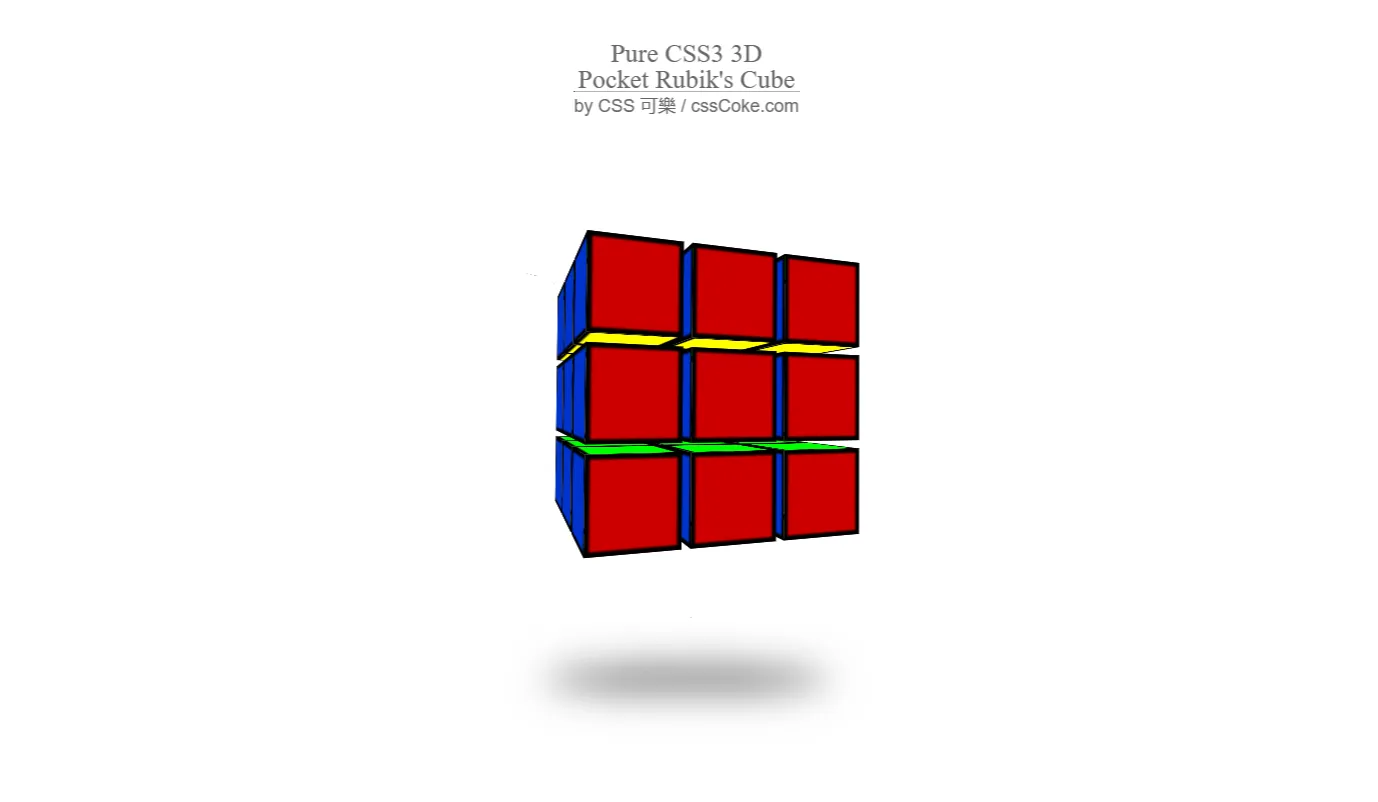
Building highly interactive, visually stunning components is the benchmark of modern frontend engineering. The Pocket Rubik's Cube simulator is an immersive 3D frontend web project engineered specifically for developers, designers, and students aiming to master WebGL, matrix transformations, and responsive user interfaces.
This project was built to bridge the gap between flat 2D layouts and hardware-accelerated 3D graphics inside the browser. While standard web applications focus heavily on transactional forms and data grids, modern creative frontends demand fluid, spatial interaction. By rendering a fully functional, classic $2 \times 2 \times 2$ mini-cube (commonly known as the Pocket Cube), this application solves a significant technical challenge: mapping standard 2D mouse drags or touchscreen swipes onto an arbitrary 3D coordinate space ($X, Y, Z$ axes) in real time.
For developers and computer science students, this codebase serves as an accessible boilerplate. Instead of struggling with the math behind raycasting or quaternion rotations from scratch, engineers can deploy this project to instantly inspect how 3D meshes are grouped, animated, and manipulated via object-oriented JavaScript. The interface leverages Bootstrap 5 to wrap a high-performance HTML5 canvas into an app-like shell, ensuring that the puzzle looks pristine on a desktop monitor in New York or a smartphone screen on the go.
Integrating this project into your learning pipeline or production repository provides an immediate advantage. It eliminates the steep setup curve usually associated with WebGL projects, offering a structured, semantic layout where canvas rendering and user control loops coexist cleanly alongside component utilities.
Key Features
- High-Performance 3D Rendering: Powered by the Three.js library for hardware-accelerated graphics inside an HTML5 canvas element.
- Intuitive Raycasting Controls: Users can click and drag directly on separate cube faces to initiate natural, vector-based segment rotations.
- Algorithmic Scrambler: Features a built-in random move generator that simulates official WCA (World Cube Association) randomization.
- Responsive UI Canvas: Seamless execution across variable viewport breakpoints via fluid Bootstrap 5 grid layout behaviors.
- State Tracking Logic: Monitors spatial coordinates of all individual cubies, preventing state desynchronization during fast inputs.
- Move History Logger: Keeps a precise index of structural transformations, allowing future extensions like undo/redo states.
- Touch Optimization: Tailored pointer event listeners translate single-touch and multi-touch mobile gestures into precise spatial rotations.
- Zero-Asset Weight: Uses purely programmatic materials, lighting vectors, and primitive geometries to minimize HTTP network requests.
Technologies Used
HTML5
The skeletal layer uses semantic HTML5 markup to provide an accessible interface frame. The primary application context is driven by a specialized canvas element, which allocates a high-performance rendering surface directly inside the Document Object Model (DOM). Standard structural elements ensure proper document indexing for search engine crawlers.
CSS3
Custom CSS3 styles manage the exact positioning constraints of the overlay systems, status displays, and full-bleed viewport heights. By leveraging flexible box layouts and hardware-accelerated CSS transforms, the project keeps the canvas rendering thread entirely separate from UI animation rendering layers, preserving system performance.
Bootstrap 5
Bootstrap 5 delivers a modern, layout utility framework without relying on bloated jQuery dependencies. It handles the structural grids, responsive button blocks, and absolute positioning wrappers, ensuring the user interface responds immediately across desktop, tablet, and mobile browsers while matching universal design patterns.
JavaScript & Three.js
Vanilla JavaScript serves as the core runtime layer, handling event capture, rotation algorithms, and state management. The Three.js abstraction library sits directly on top of the browser's native WebGL API, handling the creation of the 3D scene, lighting rigs, perspective cameras, materials, and rendering loop executions.
How It Works
The internal operation of the Pocket Rubik's Cube simulator relies on a continuous game-style architecture loop. When the browser initializes the project instance, the JavaScript engine builds a global 3D scene, positions a camera array with a wide field of view, and appends a WebGL renderer straight inside the canvas wrapper.
The structural composition of the $2 \times 2 \times 2$ matrix is created by instantiating eight independent, individual cube meshes, or "cubies." Each cubie is generated with a unique spatial offset relative to the absolute center point $(0,0,0)$. The outer faces of these sub-cubes are mapped using distinct material properties, assigning the iconic six-color palette to the appropriate normal vectors.
Interaction works via automated vector math calculations. When a user clicks or touches the surface, a mathematical vector ray is cast from the camera's screen-space coordinates through the 3D projection plane. This technique identifies which individual cubie face has been selected. As the user moves their cursor, the script determines the movement vector, maps it to the closest coordinate plane, and isolates the target sub-group of four cubies. The application then applies a smooth rotational animation matrix to that specific cluster, updating the global state array as soon as the interaction finishes.
Benefits across Disciplines
This modular application offers unique advantages tailored to various professional and educational goals within the tech landscape:
| Target Group | Core Educational & Commercial Value |
|---|---|
| Students | Provides a clear, practical implementation of vector logic, matrix transformations, and object-oriented structure that brings abstract math to life. |
| Developers | Serves as an optimized boilerplate for asynchronous user interaction frameworks, camera tracking, and custom WebGL engines. |
| Designers | Offers an open sandbox to experiment with dynamic lighting, material properties, physical shined textures, and interactive UI design patterns. |
| Freelancers | Delivers a highly interactive component that can be repurposed into complex 3D product configurations, landing page features, or mini-games. |
| Portfolio Creators | Acts as an attention-grabbing, interactive case study that demonstrates strong JavaScript, math, and UI engineering skills to hiring managers. |
Real World Use Cases
-
Interactive E-Commerce Product CustomizersUse the base raycasting and sub-mesh rotation logic to create fully interactive 3D product builders, such as modular furniture or customizable footwear configurations.
-
Gamified Educational ApplicationsAdapt the core algorithm to teach spatial reasoning, geometric theory, and algorithmic problem-solving in educational web portals.
-
Technical Interview DemonstrationsPresent the codebase during advanced frontend engineering interviews to prove deep expertise in handling canvas-based state mutations and mathematical transforms.
-
High-Engagement Landing Page HooksIncrease average time-on-site metrics by deploying the application as a playful, interactive micro-game right within hero layout sections.
-
WebGL & 3D Engine BoilerplatesStrip out the puzzle logic to use the underlying Three.js lighting, camera rendering setup, and event bindings as a clean base for separate 3D projects.
-
Mobile Web App Performance TestingUtilize the application as a benchmarking tool to analyze frame-rate capabilities, garbage collection cycles, and thread utilization across different mobile browsers.
-
Algorithm Visualizer ModulesExpand the codebase into an automated solver interface, providing a step-by-step visual display of graph search algorithms like $A^*$ or Kociemba's method.
-
Creative Coding PortfoliosPublish the project directly on developer profile hubs to display advanced mastery of multi-dimensional spaces and user interactions.
Performance & SEO
Performance optimization sits at the very heart of this 3D simulator's structure. By leaning heavily on native matrix manipulation mathematics, the rendering loop avoids continuous garbage collection pauses, sustaining a fluid 60 frames per second (FPS) execution curve on the vast majority of modern mobile and desktop viewports.
The frontend architecture uses clean, semantic HTML5 tags alongside highly structured CSS parameters. This setup allows modern search engines to easily index the contextual framework surrounding the canvas element. External asset bloat is reduced down to zero by using programmatic procedural maps for colors, lines, and textures instead of heavy external image payloads. This drastically accelerates structural Core Web Vitals performance indicators like Largest Contentful Paint (LCP) and First Input Delay (FID).
Accessibility concerns are managed by integrating text fallback descriptive attributes, clear interactive link focuses, and native ARIA roles for control interfaces. The application features built-in fluid scaling systems that monitor layout bounds, dynamically recalculating the canvas projection aspect ratios instantly whenever screen orientation shifts occur.
Customization Guide
Customizing the core mechanics of the Pocket Rubik's Cube simulator is straightforward, thanks to its modular, decoupled codebase architecture:
-
Modifying the Colors:
Locate the global material declarations block within the configuration file. Swap out the standard hex color strings inside the
THREE.MeshBasicMaterialarray to easily introduce neon palettes, dark mode themes, or pastel color sets. - Tweaking Animation Speeds: Adjust the interpolation delta step variables inside the rotation execution function. Increasing the rotational step values creates instant, snapping state movements, while lower values yield smooth, cinematic transitions.
- Reconfiguring Layout & HUD Components: Adjust the Bootstrap 5 columns and container classes inside the index file to easily rearrange button toolbars, overlay timers, move logs, or layout dimensions.
- Typography Upgrades: Inject custom variable font families through the utility sheet layer. You can restyle overlay readouts and control panels using modern geometric sans-serif fonts or monospace typefaces to give it an arcade aesthetic.
- Adding Custom Component UI: Insert additional action bars, tracking parameters, or analytical tools by leveraging Bootstrap's button groups. Simply bind these components directly to your extended JavaScript methods to quickly expand your project's feature set.
Who Should Use This Project?
This interactive frontend architecture is ideal for frontend web engineers who want to break past traditional two-dimensional document layouts and move confidently into building interactive 3D web spaces. It serves as a practical, production-ready reference point for developers wanting to integrate complex WebGL canvases alongside popular responsive UI tools like Bootstrap.
It is equally valuable for self-taught programmers and computer science students looking for a comprehensive capstone project that proves their ability to handle user interaction events, coordinate systems, and object-oriented javascript architecture. Ultimately, anyone wanting to showcase a highly polished, responsive web application on their developer portfolio will find this codebase to be an excellent, high-impact asset.
Conclusion
The Pocket Rubik's Cube project stands as a complete blueprint for high-performance, modern 3D interaction inside browser viewports. By cleanly integrating HTML5 canvas elements, responsive Bootstrap 5 structures, and robust Three.js matrix systems, it demonstrates how to deliver engaging, immersive web experiences without sacrificing fast page load speeds or semantic code quality.
Whether your goal is to study the underlying vector math, create an eye-catching addition to your personal portfolio, or build advanced 3D configurators, this codebase provides an optimized foundation. Explore the architecture, modify the variables, and use these interactive strategies to elevate your future web creation workflows.
Frequently Asked Questions
How does this project work?
The simulator uses Three.js to render eight individual sub-meshes inside an HTML5 canvas element. JavaScript vector raycasting tracks mouse and touch movements, grouping the appropriate cubies and applying smooth 3D rotation animations whenever you drag a face.
Can beginners learn from this project?
Yes! While the underlying mathematical rotation matrices are advanced, the codebase features clear organization and highly readable structures. This makes it an excellent learning tool for intermediate developers looking to expand their skills into interactive 3D web design.
Is it mobile responsive?
Absolutely. The canvas asset dynamically updates its internal projection proportions based on active browser breakpoints, while Bootstrap 5 handles structural layout scaling across desktop, tablet, and smartphone screens.
Can I use it commercially?
Yes, this open-source template can be used for commercial deployments, client applications, portfolio entries, or custom interactive product configurations without any platform restrictions.
How do I customize it?
You can customize the simulator by opening the project files and updating the hex value arrays to change face colors, modifying the rotation delta variables to tweak speeds, or adjusting the Bootstrap 5 classes to reorganize the layout.
Does it require Bootstrap?
The 3D canvas logic itself runs on vanilla JavaScript and Three.js. However, the external application container, navigation menus, and control buttons rely on Bootstrap 5 to ensure a clean, responsive layout right out of the box.
Is JavaScript required?
Yes, JavaScript is absolutely required. It serves as the primary engine for the application, handling all the logic for rendering the 3D environment, calculating raycasting intersections, and animating the cube rotations.
Can I add this to my portfolio?
Yes, publishing this project on your personal portfolio is highly recommended. It serves as an impressive case study that clearly demonstrates your ability to build complex, highly interactive 3D web applications.
Download is Locked
Please scroll down to view the full page and unlock the download link.
Your Download is Ready
Click the button below to retrieve the project source code.
More Related Items by CodeTap
View All